

Set a special price
1
Select products
Check the products you want to put on sale, or use filters and select all matching results.
2
Open Bulk Edit and choose Set Special Price
Click Edit on the selection bar, then pick Set special price under Pricing. You can also search for it.
3
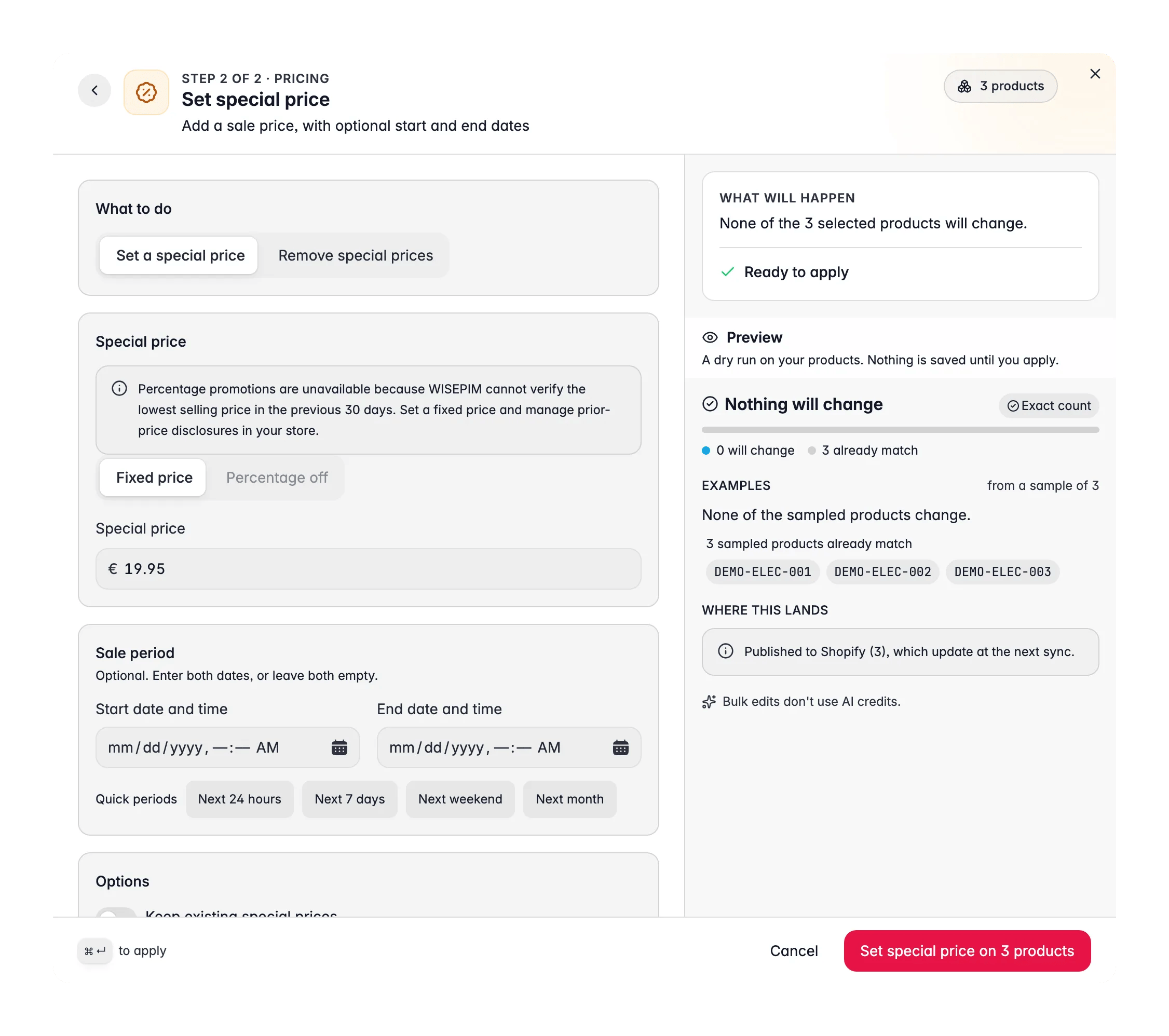
Set the price
Choose Set a special price and enter the Special price, for example €9.99. It must be above 0.
4
Set the sale period (optional)
Enter a Start date and time and an End date and time, or use a quick period. Enter both dates, or leave both empty.
5
Check What will happen and apply
Decide whether to Keep existing special prices, check the dry run, then apply.
Options
Quick periods
Which products are skipped
A special price must be below the regular price. Products whose regular price is not above the special price keep their current prices and are listed as skipped in the Process Tracker. Products without a price never get one.Removing a special price in your shop
When you remove a special price, or it is set to zero or expires, the next export clears it in shops that receive sale prices, such as WooCommerce, Magento, CCV Shop and ShopWired.Tips
- Leave Keep existing special prices on when you add a broad sale, so deeper discounts you set on single products stay in place.
- Read What will happen before you apply. It shows example products with their price before and after, and how many are skipped.
Related
Change Price
Adjust regular prices in bulk.
Apply Volume Discounts
Set tiered pricing for larger quantities.