> ## Documentation Index
> Fetch the complete documentation index at: https://docs.wisepim.com/llms.txt
> Use this file to discover all available pages before exploring further.
# Logic nodes
> Shape the flow of your automation. Branch products with if/then rules, merge parallel paths back together, and add delays between steps.
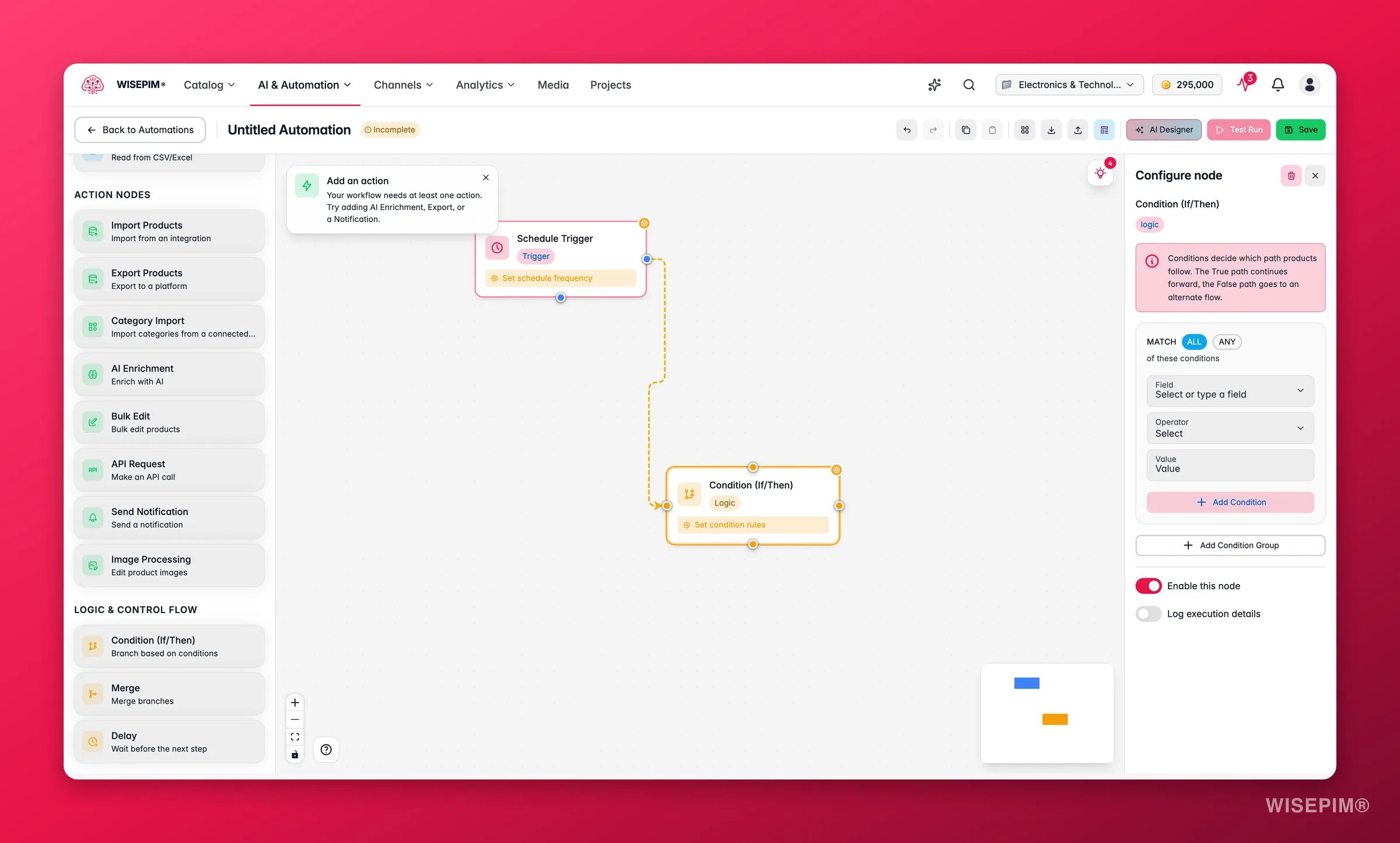
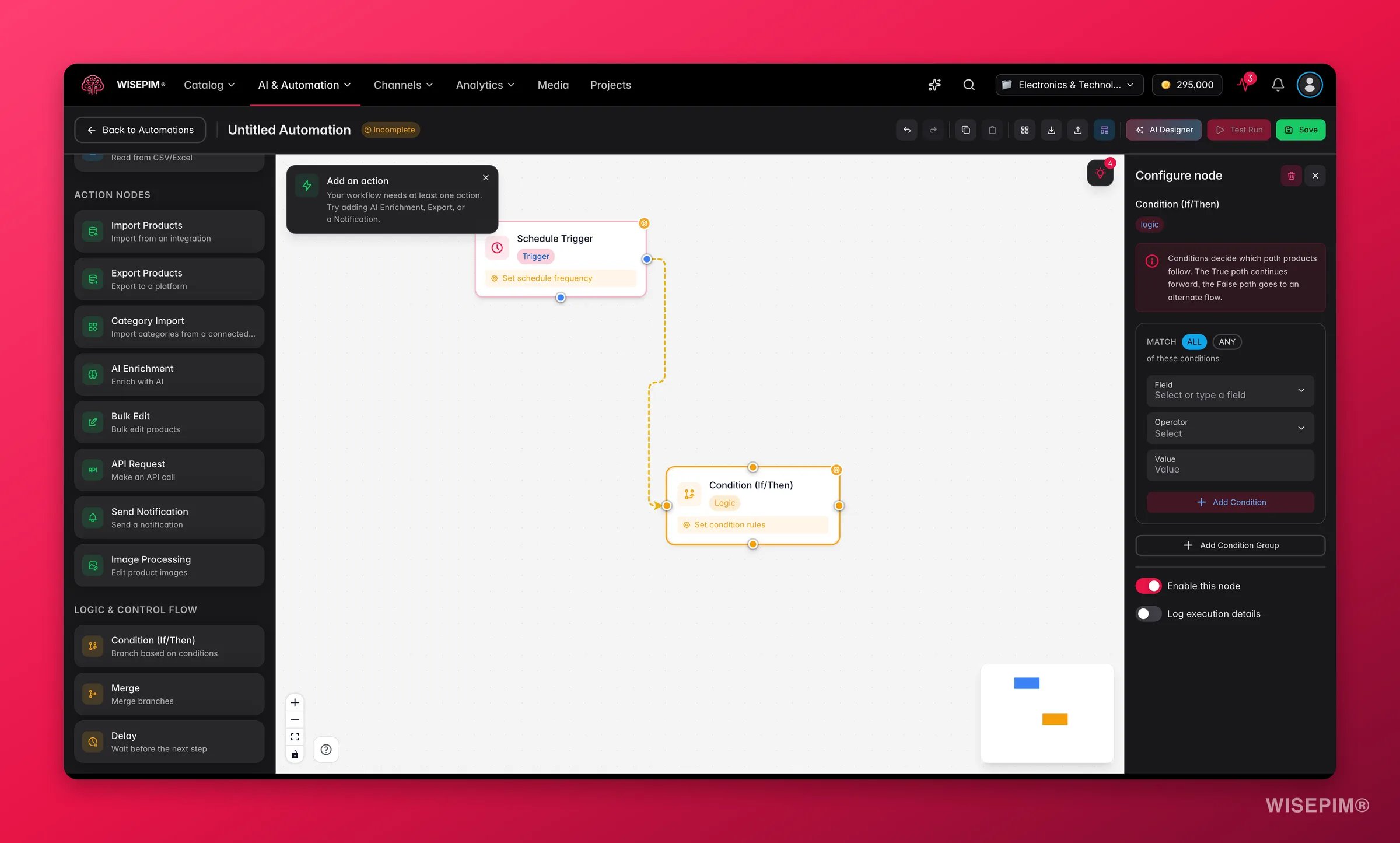 Logic nodes shape how products move through your automation. Use them to branch the flow, merge paths back together, or pause between steps.
Logic nodes work with any trigger, data node, or action node. Add them anywhere in your workflow to control how products are routed.
## Branch with if/then logic
The Condition node splits the flow in two. Products that match follow the "true" path. Products that don't follow the "false" path.
| Setting | What it does |
| -------------------- | ------------------------------------------------------- |
| **Condition groups** | One or more groups of rules to evaluate |
| **Group logic** | AND (all groups must match) or OR (any group can match) |
Each group holds one or more rules:
| Rule setting | What it does |
| ------------ | ----------------------------------------------------------------------------- |
| **Field** | The product field to check (title, price, status, category, or any attribute) |
| **Operator** | The comparison to run |
| **Value** | The value to compare against |
The operators you can pick depend on the field type:
| Field type | Operators |
| ------------------- | ----------------------------------------------------------------------------------------------- |
| **Text** | equals, not equals, contains, does not contain, starts with, ends with, is empty, is not empty |
| **Numeric** | equals, not equals, greater than, less than, greater than or equal, less than or equal, between |
| **Select / Status** | equals, not equals, is one of, is not one of |
| **Boolean** | is true, is false |
| **Date** | before, after, between, is empty |
Use several condition groups with OR logic to build richer branches. For example, route products to different export channels based on category or price range.
## Merge parallel paths
The Merge node brings two or more branches back into one flow. It collects products from every incoming connection and passes them on as a single set.
No setup is needed. Just connect each branch to the merge node's input handles.
Use it to:
* Recombine the true and false paths after a Condition node
* Bring parallel action branches together before a final step, such as a summary notification
## Add a delay
The Delay node pauses the workflow before it moves to the next node.
| Setting | What it does |
| -------------- | ------------------------------------------------------------ |
| **Delay type** | Fixed duration, random duration, or until a set time |
| **Duration** | For fixed delays: how long to wait (minutes, hours, or days) |
| **Range** | For random delays: a minimum and maximum duration |
| **Until time** | For time-based delays: the time of day to resume |
Use it to:
* Wait between an import and an export to leave time for manual review
* Space out API calls to stay under rate limits
* Hold notifications until business hours
## Related
Control which products flow through your workflow.
See every action your automations can run.
Decide what starts your automation and when.
Drag, connect, and configure nodes on the canvas.
Logic nodes shape how products move through your automation. Use them to branch the flow, merge paths back together, or pause between steps.
Logic nodes work with any trigger, data node, or action node. Add them anywhere in your workflow to control how products are routed.
## Branch with if/then logic
The Condition node splits the flow in two. Products that match follow the "true" path. Products that don't follow the "false" path.
| Setting | What it does |
| -------------------- | ------------------------------------------------------- |
| **Condition groups** | One or more groups of rules to evaluate |
| **Group logic** | AND (all groups must match) or OR (any group can match) |
Each group holds one or more rules:
| Rule setting | What it does |
| ------------ | ----------------------------------------------------------------------------- |
| **Field** | The product field to check (title, price, status, category, or any attribute) |
| **Operator** | The comparison to run |
| **Value** | The value to compare against |
The operators you can pick depend on the field type:
| Field type | Operators |
| ------------------- | ----------------------------------------------------------------------------------------------- |
| **Text** | equals, not equals, contains, does not contain, starts with, ends with, is empty, is not empty |
| **Numeric** | equals, not equals, greater than, less than, greater than or equal, less than or equal, between |
| **Select / Status** | equals, not equals, is one of, is not one of |
| **Boolean** | is true, is false |
| **Date** | before, after, between, is empty |
Use several condition groups with OR logic to build richer branches. For example, route products to different export channels based on category or price range.
## Merge parallel paths
The Merge node brings two or more branches back into one flow. It collects products from every incoming connection and passes them on as a single set.
No setup is needed. Just connect each branch to the merge node's input handles.
Use it to:
* Recombine the true and false paths after a Condition node
* Bring parallel action branches together before a final step, such as a summary notification
## Add a delay
The Delay node pauses the workflow before it moves to the next node.
| Setting | What it does |
| -------------- | ------------------------------------------------------------ |
| **Delay type** | Fixed duration, random duration, or until a set time |
| **Duration** | For fixed delays: how long to wait (minutes, hours, or days) |
| **Range** | For random delays: a minimum and maximum duration |
| **Until time** | For time-based delays: the time of day to resume |
Use it to:
* Wait between an import and an export to leave time for manual review
* Space out API calls to stay under rate limits
* Hold notifications until business hours
## Related
Control which products flow through your workflow.
See every action your automations can run.
Decide what starts your automation and when.
Drag, connect, and configure nodes on the canvas.